Everyone says "AI agent" now. A chatbot with a fancy prompt? Agent. A script that calls GPT twice? Also agent, apparently.
So let me explain what an agent actually is, and instead of a textbook definition, I'll show you one I built and actually use: minicli. It's a personal assistant that lives in my terminal and on Telegram.
 I type one command,
mini, and all of this comes online.
Chatbot vs agent, the simple version
Think of two friends.
You tell the first one, "I need to remember to submit my PR tomorrow." They say, "Oh nice, you should set a reminder!" Helpful advice. That's a chatbot.
You tell the second one the same thing. They open your to-do app, add the task for tomorrow, and text you back "done." That's an agent.
Same message. One talks, the other actually does something.
To do things, an agent needs three parts:
- A brain (the AI model). It reads what you want and decides the next step.
- Hands (tools). Real actions it can take, like reading email, adding a task, or searching the web.
- A memory. So it doesn't forget everything the moment you close the chat.
Everything else is just wiring. So here's how minicli is wired.
Two halves: front desk and back office
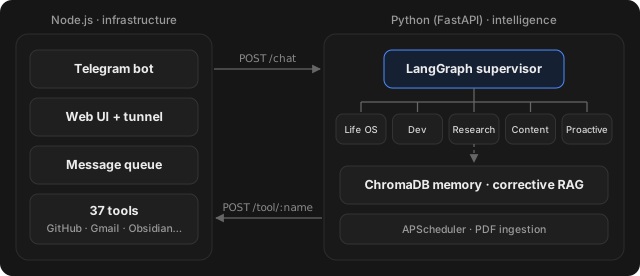 Node.js on the left does the doing, Python on the right does the thinking. They talk over simple web requests.
I split minicli into two programs that talk to each other:
- Node.js is the front desk. It handles Telegram, the web UI, a tunnel so I can reach it from anywhere, a queue so messages don't get mixed up, and all 37 tools: files, terminal, GitHub, Gmail, Calendar, TickTick, Obsidian, web search, news.
- Python is the back office. That's where the thinking happens: the AI agents, memory, search and scheduling.
So when I send a message on Telegram, the front desk passes it to the back office (POST /chat). And when the back office needs something done, like "add this task," it asks the front desk (POST /tool/:name).
Why split it? Python has the best AI libraries, and Node.js is great at running bots and servers. So each half does what it's good at.
The receptionist who sends you to the right person
Inside the Python half, there's a supervisor. Think of a receptionist at a big office. You walk in, say what you need, and they send you to the right department.
minicli has five departments:
- "what's on my calendar?" → Life OS (tasks and calendar)
- "any open PRs on minicli?" → Dev (GitHub and code)
- "latest AI news" → Research (web search and news)
- "tweet this: just shipped v2" → Content (writing stuff)
- Proactive doesn't wait to be asked. It runs on a schedule and messages me when something needs attention.
Why not one big agent that does everything? Because the more tools you give one agent, the worse it gets at picking the right one. Five small specialists plus one receptionist keeps every decision easy.
A memory that double-checks itself
Everything I send gets saved into a memory store (ChromaDB). So if I ask "what did I decide about that API last week?", it can find it by meaning, not by me scrolling through old chats. I can even send it a PDF and it'll read and remember it.
But here's a problem with normal AI memory: it grabs whatever looks closest and trusts it, even when it's totally unrelated. Ask about your dentist appointment and it might confidently answer from your notes about dental insurance.
So minicli uses something called corrective RAG. Fancy name, simple idea:
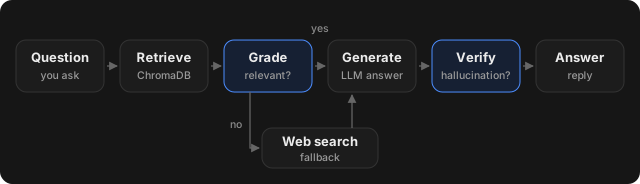 If its notes don't actually help, it googles instead of guessing.
- Look through my notes.
- Ask: "is this actually relevant?"
- If not, search the web instead.
- Write the answer.
- Re-read the answer and check it's not making stuff up.
- Then reply.
It's exactly what a careful person does. Check your notes, realise they don't help, look it up, then read your answer once more before you hit send.
So, what's an agent?
Honestly, it's a loop:
understand → pick a tool → use it → check the result → repeat until done → remember what happened.
The AI makes the decisions inside that loop. The tools, the receptionist and the memory are what make those decisions actually useful.
minicli is open source if you want to poke around: github.com/parthchilwerwar/minicli.
Sources
- minicli on GitHub: the code, setup guide and full architecture
- LangGraph docs: the framework behind the supervisor and the five workers
- ChromaDB docs: the vector database minicli uses for memory
- Corrective Retrieval Augmented Generation (Yan et al., 2024): the paper behind the "grade it, then fall back to search" idea